Public Transport
Dashticz currently supports the following types of public transport info:
Public transport timetable, configurable via a public transport block:
Train info Netherlands (‘treinen’)
Bus/tram/boat info Netherlands (‘ovapi’)
openbaar vervoer Netherlands (‘drgl’)
irail (Belgium)
delijn (Belgium)
Predefined blocks, see Predefined public transport blocks
'traffic'. Traffic info from Rijkswaterstaat Verkeersinfo (Netherlands)'train'. Train status from Rijden de Treinen (Netherlands)
A public transport block can be configured as follows:
//example station id: Utrecht
blocks['treinen']= {
  station: 'UT',
  title:'OV Info',
  show_lastupdate:true,
  provider: 'treinen',
  show_via: true,
  icon: 'fas fa-train',
  results: 5
};
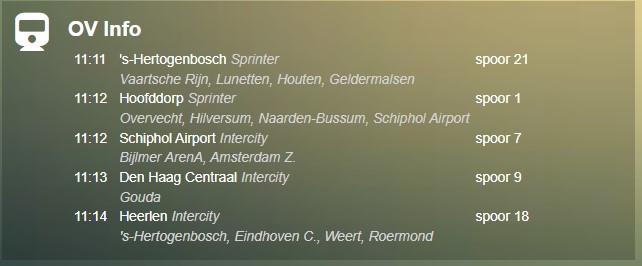
Parameters
Parameter |
Description |
|---|---|
station |
The station id. See Usage sections below to find how to obtain the right station id. |
title |
Title of the block |
show_lastupdate |
|
provider |
Public transport info provider to use. Choose from
'treinen' Netherlands: trains'ovapi' Netherlands: bus, tram, boat'drgl' Netherlands dienstregeling'irailbe' Belgium: trains'delijnbe' Belgium: bus, tram, boat |
direction |
Set the line direction(s) to filter the direction. (comma seperated) (for
ovapi, delijnbe)'1' : Filter on direction 1'1,2': Filter on direction 1 or 2 |
destination |
Set the end destination station name to filter the direction.
'Den Haag De Uithof,Den Haag Loosduinen' (comma seperated, case sensitive) |
service |
Set the specific services (Dutch: lijnnummers) to further filter the result
'3,4' (comma seperated) |
show_via |
|
show_direction |
|
lang |
'nl', 'fr', 'en', 'de' : Set the language for search results (only for irailbe)Default value is derived from the Dashticz language setting.
|
icon |
The font-awesome icon (including
fas fa-)'fas fa-bus', 'fas fa-tram', 'fas fa-train', 'fas fa-ship', 'fas fa-subway', … |
interval |
time in seconds for refreshing the data |
results |
Number of results to show |
width |
To customize the width. It’s not recommended to change the default value ( |
url |
|
newwindow |
0: open in current window1: open in new window2: open in new frame (default, to prevent a breaking change in default behavior)3: no new window/frame (for intent handling, api calls). HTTP get request.4: no new window/frame (for intent handling, api calls). HTTP post request. (forcerefresh not supported) |
Usage
Treinen
blocks['treinen']= {
  station: 'UT',
  title:'OV Info',
  show_lastupdate:true,
  provider: 'treinen',
  show_via: true,
  icon: 'fas fa-train',
  results: 5
};
The station code can be found in search box at: https://www.rijdendetreinen.nl/vertrektijden
The station code is the short code right of the station name:
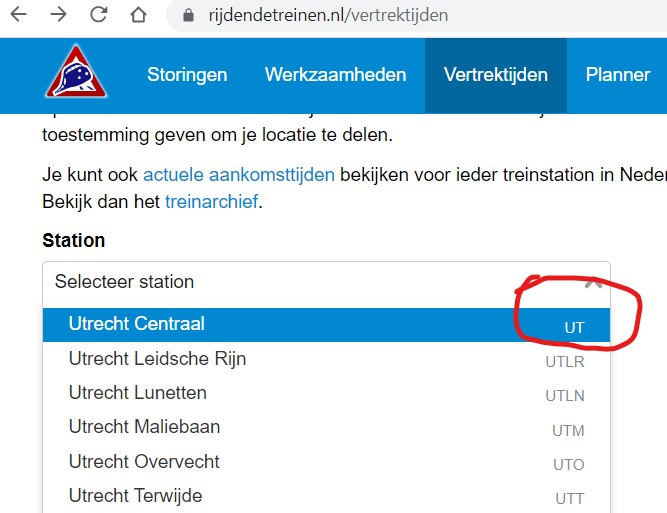
- Examples:
Utrecht: UT
Amsterdam Centraal: ASD
ovapi
Use ovapi to obtain bus/tram/boat departure information:
blocks['ovapi'] = {
    station: 'utrlun',   //utrlun, Amstel: 60094
    title:'Utrech Lunetten',
    show_lastupdate:true,
    provider: 'ovapi',
    show_via: true,
    icon: 'fas fa-bus',
    results: 5
};
In the previous example bus station Utrecht Lunetten is used. A bus station can be a collection of several bus stops. For instance, the busstation close to a railway station often has several platforms. Or, if there is a busstop at both sides to the road, then this also may be defined as busstation.
A bus station has a station code.
A bus stop has a so called tpc code.
The tpc codes for individual bus stops can be found on https://ovzoeker.nl. On the map click on a bus stop. The popup window will show the tpc code, which is the number behind ‘haltenummer’:
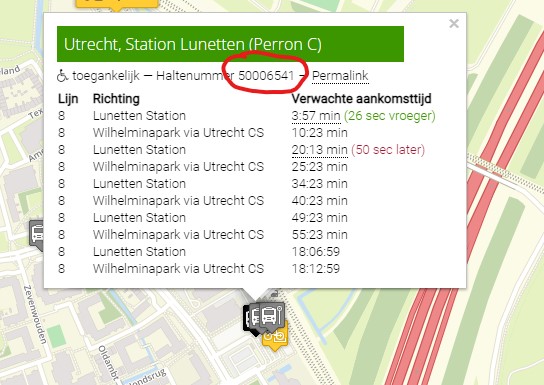
In the previous example the tpc code for Utrecht Lunetten Perron C is 50006541.
To find the station code follow the following url: https://v0.ovapi.nl/tpc/50006541
In the json code that will be displayed locate the first areacode:

If you want to show all departures from all stops within a station (area) use the area code as station block parameter, like in the example code block above:
station: 'utrlun',
If you want to show only the departures from one specific stop or platform, use the tpc code as tpc block parameter, and remove the station parameter. Example:
blocks['mystop'] = {
    tpc: '50006541',
    title:'Utrecht Lunetten, perron C',
    provider: 'ovapi',
    results: 5
};
If you want to show all departures from all stops within a station (area), but there’s no station code available you can use multiple tpc codes. Example:
blocks['mystops'] = {
    tpc: '53602050,53602060',
    title: 'Prof. Waterinklaan',
    provider: 'ovapi',
    results: 6
};
irail
To find the station code fill in the search box on: https://irail.be/stations/NMBS
After selecting your favorite station, and clicking on ‘View Liveboard’ the station code is the last word in the url in the address bar:
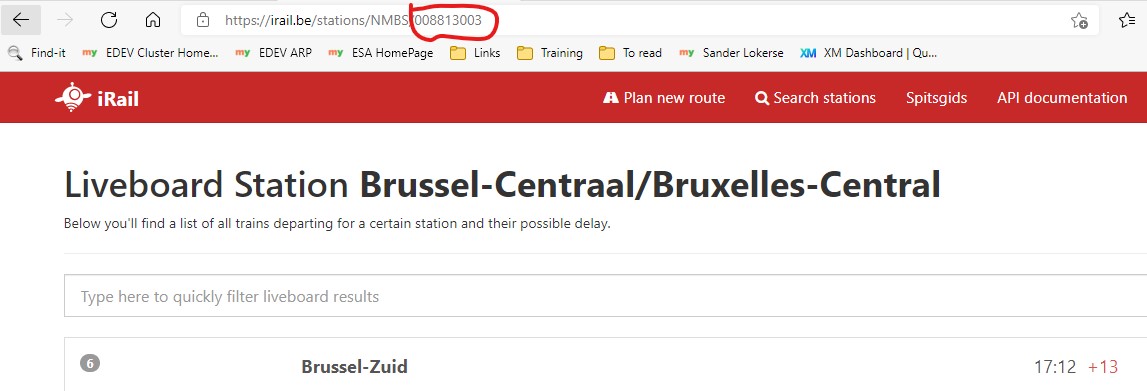
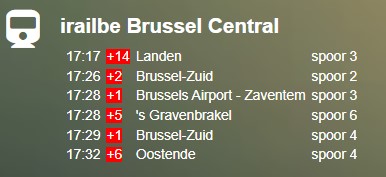
For Bruxelles Central the station code is 008813003:
blocks['irailbe'] = {
    station: '008813003',
    title:'irailbe Brussel Central',
    show_lastupdate:true,
    provider: 'irailbe',
    show_via: true,
    icon: 'fas fa-train',
    results: 5
};
De lijn
The station code consists of 6 digits. Search for your station code in the search box on https://delijn.be
drgl
Find your station code via https://drgl.nl
Search for a bus or train station name in the search box.
The browser url will show the station code.
Busstation codes are numeric. Train station codes are textual.
Examples:
https://drgl.nl/stop/NL:S:asd, This is a trainstation with code
'asd'which is Amsterdam CShttps://drgl.nl/stop/NL:S:57005010, This is a busstation with code
'57005010'which is Amsterdam CS busstation
Sometimes you first have to click on a specific line, and then on the busstop or train station you need, to get the right station code.
Block example:
blocks['drgl'] = {
  type: 'publictransport',
  title: 'Utrecht bus centrumzijde',
  provider: 'drgl',
  station: '30009500'
}
Predefined public transport blocks
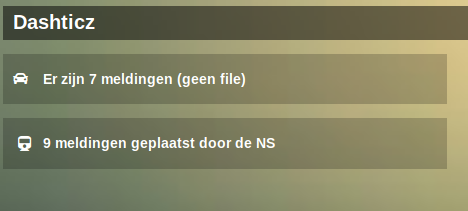
There are two predefined public transport blocks:
'traffic': Rijkswaterstaat Verkeersinfo (The Netherlands)
'train': Rijden de Treinen (The Netherlands)
Example for your ‘’CONFIG.js’’:
columns[2] = {
  blocks: ['traffic', 'train'],
  width: 5
}
VVS
Not supported anymore (VVS disabled it’s api)
9292.nl
Not supported anymore. 9292 doesn’t provide a public API key.
Styling
Font size can be changed by adding this to your custom.css and change to your own preference:
.publictransport div {
    font-size: 13px;
}
In case no info is available then the CSS class empty will be added to block.
This can be used to adjust the styling of an empty block via custom.css